


How do I verify my payment method?
Why do I need to verify my payment method?
To comply with licensing and security requirements, we must confirm that you own any payment methods used for deposits or withdrawals.
Verification is required only once per payment account.
Once a payment method is verified, you will not need to verify it again unless additional checks are required.
How is my information protected?
All submitted documents are stored securely and used only for payment verification purposes.
When do I need to verify my payment account?
Verification is required:
- Before the first deposit using a new payment method
- Before the first withdrawal using a new payment method
A valid ID may also be required before withdrawals can be processed.
If you already submitted a valid ID previously, you do not need to resend it.
How do I upload payment verification documents?
When using a new payment method in the 'Cashier', you’ll be prompted to upload proof of ownership.
Follow the on-screen instructions to submit your documents.
You can upload documents using:
- Desktop software
- Mobile app
- Website
What documents are required for each payment method?
Required documents depend on the payment method used.
Apple Pay
Provide one of the following:
- Screenshot of Apple Wallet showing:
- The card used
- A deposit made to PokerStars
OR
- Photo of the physical card
For virtual cards, include:
- First 6 and last 4 digits
- Name (if displayed)
- Issue date
- Expiry date
Visa and Mastercard
Provide one of the following:
- Card statement issued within 3 months showing:
- Cardholder name
- Expiry date
- First 6 and last 4 digits
Screenshot of edited card number
OR
- Copy of the card showing only:
- First 6 digits
- Last 4 digits
Do not include full card numbers or transaction history.
Trustly, direct bank transfer and wire transfer
Provide one of the following:
- Screenshot of online banking summary page showing:
- Full name
- Account details
- Visible URL
OR
- Bank statement issued within 3 months showing:
- Name
- IBAN
- Swift/BIC code
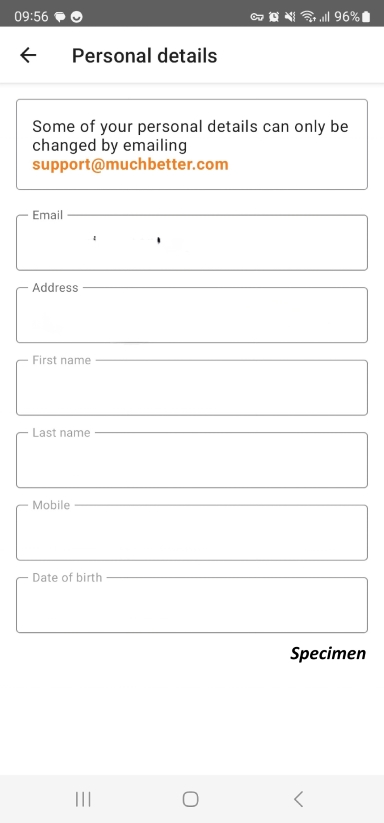
MuchBetter
Provide:
- Screenshot of the 'Personal Details' section showing:
- Name
- Date of birth
- Address
- Phone number
If using a MuchBetter Mastercard, also provide a copy showing only the first 6 and last 4 digits.
Screenshot of MuchBetter's 'Personal Details' screen (mobile)
PayPal
Provide a screenshot of the ‘Account’ page showing:
- Name
- Address
- Merchant or Vendor ID (if applicable)
- Visible URL
You can see some examples below:
Screenshot of Account page in PayPal (desktop) 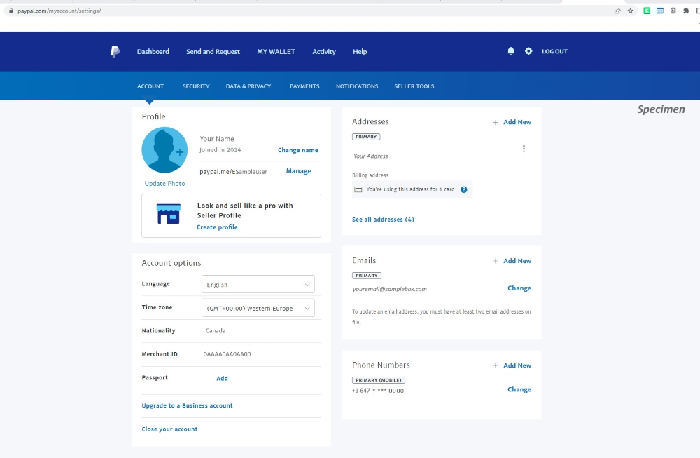
Screenshot of Account page in PayPal (mobile)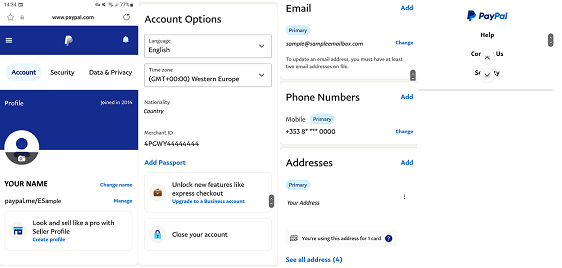
Neteller
Provide a screenshot of the ‘Account Overview’ page showing:
- Name
- Registered email address
- Visible URL
Skrill
Provide a screenshot of the ‘Personal Details’ page showing:
- Name
- Registered email address
- Visible URL
Webmoney
Provide a screenshot of the ‘My Account’ page showing:
- Personal details
- Visible URL
How do I protect my payment information before uploading documents?
Sensitive payment information must be masked before you sent it.
Card numbers
Show only:
- First 6 digits
- Last 4 digits
Example:
444444******4444
Account numbers
Show only:
- First character
- Last 4 characters
Example:
7*****7777
IBANs
Show only:
- First 2 letters
- Last 4 numbers
Example:
XX******************1234
Did you find this article useful?
Related Articles
- How to check the payment methods I can use for deposits and withdrawals?
- Finding tickets, tournaments and players
- How do I get free Play Money chips?
- General Terms
- How to make a deposit
- Deposit with a card
- Update your personal details on PokerStars
- Verify your payment method
- Manage your time and spending
- GDPR and personal information safety